
目前所了解的是3DC+3exchange
3DC(Domain Controllers)负责保存账号数据,登录验证,DC间互相同步,域内所有机器的DNS指向DC01(负责网络发现)其实很像kubernetes的etcd数据库的权限机制(保证数据一致性统一性)。
3exchange就是给整个域安装了一个邮箱扩展,我所看到的邮箱数据文件.edb,貌似是1个主2个副本定期同步
# 新建数据库(示例:DB01)
New-MailboxDatabase -Name DB01 -Server EX01 -EdbFilePath D:\ExchangeDB\DB01\DB01.edb -LogFolderPath D:\ExchangeLog\DB01

# 挂载数据库
Mount-Database -Identity DB01

# 添加数据库副本到EX02、EX03
Add-MailboxDatabaseCopy -Identity DB01 -MailboxServer EX02 -ActivationPreference 2
Add-MailboxDatabaseCopy -Identity DB01 -MailboxServer EX03 -ActivationPreference 3

# 重复创建DB02、DB03,分布在不同服务器
DNS服务器:我的理解是它负责整个内网的dns域名解析(域名-ip)
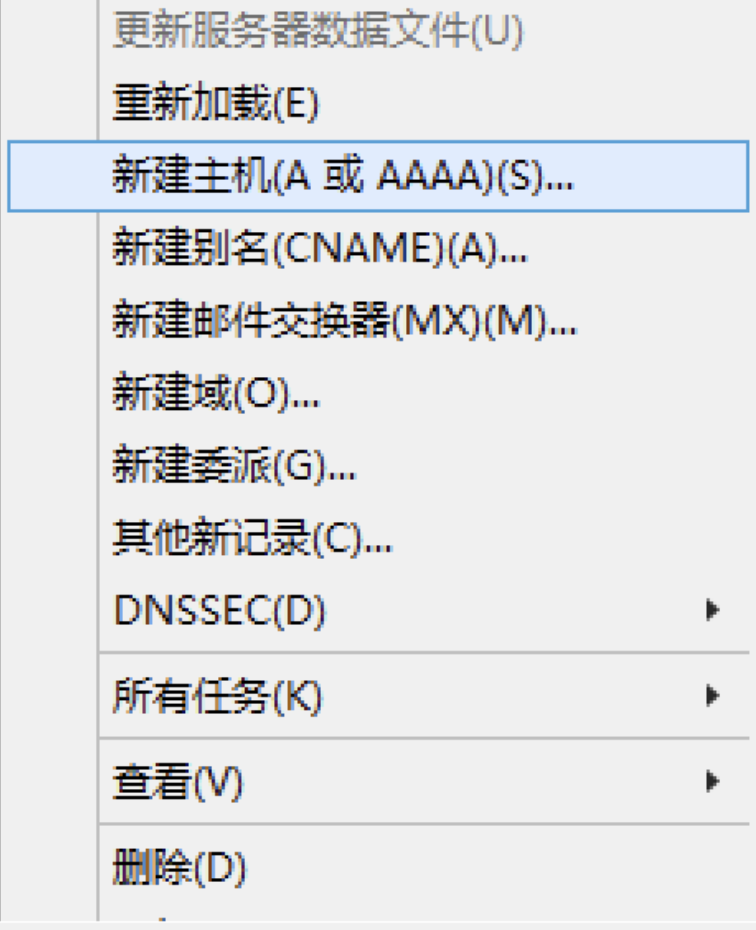
我们常用的就是添加内网dns解析 打开服务器控制面板-右上角工具-DNS-右键域名添加A记录
TTL = Time To Live(生存时间)就是ip查询周期,越短越快当然压力越大。
检查命令
# 测试正向解析
nslookup ex01.company.com
# 或
ping ex01.company.com
关于filez网盘
1.filez会对整个组织架构的特定ou(为什么是特定ou因为名额=momery)进行定期同步最快3h或者手动同步将权限给到蓝色组织架构组,即可将权限一次性给到。但是目前有bug,如果ad域中组织架构出现变动,filez并不会做增减量更新而是备份后重新创建。
关于AD、邮箱工作维护脚本
1全量替换限定邮箱发件人.ps1
# ===============================
# 邮件组发件权限 - 覆盖模式(只保留输入名单,其余全部清除)
# 支持粘贴带引号、换行、制表符的账号
# ===============================

# ① 先输入邮件组名
$groupName = Read-Host "请输入邮件组名称(例如:jxs_xbzq)"

# ② 再粘贴用户列表(支持你那种带换行、带引号、带制表符的格式)
Write-Host "`n请粘贴用户账号(可带引号/换行/制表符,粘贴完按回车):" -ForegroundColor Cyan
$usersInput = Read-Host

# ===============================
# 自动清洗格式(核心!)
# ===============================
$cleanUsers = $usersInput -split "`n|`t| |""|'" | Where-Object {
    $_ -match '\S' -and $_ -notmatch '^["''\s]+$'
} | Select-Object -Unique

# 显示清洗后的用户
Write-Host "`n=================================" -ForegroundColor Cyan
Write-Host "已识别用户:" -ForegroundColor Green
$cleanUsers -join "  "
Write-Host "`n=================================" -ForegroundColor Cyan

# Exchange 服务器
$exchangeServer = "JAHWAEXCH1901"

# 连接 Exchange
try {
    Write-Host "正在连接 Exchange 服务器..." -ForegroundColor Cyan
    $session = New-PSSession -ConfigurationName Microsoft.Exchange -ConnectionUri http://$exchangeServer/PowerShell/ -Authentication Kerberos -ErrorAction Stop
    Import-PSSession $session -DisableNameChecking -ErrorAction Stop
    Write-Host "连接成功!`n" -ForegroundColor Green
}
catch {
    Write-Host "[ERROR] 连接失败:" $_.Exception.Message -ForegroundColor Red
    exit
}

# 验证邮件组
try {
    Get-DistributionGroup $groupName -ErrorAction Stop | Out-Null
}
catch {
    Write-Host "[ERROR] 邮件组不存在!" -ForegroundColor Red
    Remove-PSSession $session
    exit
}

# 验证用户
$validUsers = @()
foreach ($u in $cleanUsers) {
    try {
        $user = Get-Recipient $u -ErrorAction Stop
        $validUsers += $user.DistinguishedName
        Write-Host "? 有效:$u" -ForegroundColor Green
    }
    catch {
        Write-Host "? 无效:$u" -ForegroundColor Red
    }
}

# ===============================
# 覆盖设置:只保留你输入的人!
# ===============================
Set-DistributionGroup $groupName -AcceptMessagesOnlyFromSendersOrMembers $validUsers

# 结果展示
Write-Host "`n=================================" -ForegroundColor Cyan
Write-Host "? 操作完成!邮件组:$groupName" -ForegroundColor Green
Write-Host "当前仅允许以下人员发邮件:" -ForegroundColor Cyan
$cleanUsers -join "  "

# 关闭
Remove-PSSession $session
Write-Host "`n脚本结束`n" -ForegroundColor Cyan
2关闭邮箱并且返回O365用户
# ============================================
# 标准离职账号处理脚本(Hybrid环境)
# 功能:
# 1. 多行输入邮箱地址
# 2. 禁用AD账号(通过邮箱反向查找)
# 3. 禁用本地邮箱
# 4. 识别O365邮箱用户
# 5. 输出O365用户列表(邮箱格式)
# 6. 生成操作日志
# ============================================

Import-Module ActiveDirectory

$exchangeServer = "JAHWAEXCH1901"

# 日志文件
$logPath = "C:\Temp\Offboarding_Log_$(Get-Date -Format 'yyyyMMdd_HHmmss').txt"
New-Item -ItemType File -Path $logPath -Force | Out-Null

# ===============================
# 输入用户邮箱
# ===============================
Write-Host ""
Write-Host "请粘贴用户邮箱列表(每行一个邮箱)"
Write-Host "粘贴完成后按回车,再按一次回车结束输入:" -ForegroundColor Yellow

$emailList = @()

while ($true) {
    $line = Read-Host
    if ([string]::IsNullOrWhiteSpace($line)) { break }
    $emailList += $line.Trim()
}

# 去重去空
$emailList = $emailList | Where-Object { $_ -ne "" } | Sort-Object -Unique

if ($emailList.Count -eq 0) {
    Write-Host "未输入任何邮箱,脚本结束。" -ForegroundColor Red
    exit
}

# 用于存储O365用户(存储邮箱地址)
$O365Users = @()

# ===============================
# 连接 Exchange
# ===============================
try {
    $session = New-PSSession `
        -ConfigurationName Microsoft.Exchange `
        -ConnectionUri http://$exchangeServer/PowerShell/ `
        -Authentication Kerberos `
        -ErrorAction Stop

    Import-PSSession $session -DisableNameChecking -ErrorAction Stop
}
catch {
    Write-Host "[ERROR] 无法连接 Exchange:" $_.Exception.Message -ForegroundColor Red
    exit
}

# ===============================
# 开始处理
# ===============================

foreach ($email in $emailList) {

    Write-Host ""
    Write-Host "正在处理: $email" -ForegroundColor White
    Add-Content $logPath "[$(Get-Date)] 开始处理 $email"

    # ---------- 通过邮箱查找AD账号 ----------
    try {
        $adUser = Get-ADUser -Filter {EmailAddress -eq $email} -Properties Enabled, EmailAddress -ErrorAction Stop
        $username = $adUser.SamAccountName

        if ($adUser.Enabled -eq $true) {
            Disable-ADAccount -Identity $username
            Write-Host "AD账号 [$username] 已禁用" -ForegroundColor Green
            Add-Content $logPath "AD账号 [$username] 已禁用"
        }
        else {
            Write-Host "AD账号 [$username] 已是禁用状态" -ForegroundColor DarkGray
            Add-Content $logPath "AD账号 [$username] 已是禁用状态"
        }
    }
    catch {
        Write-Host "[ERROR] 未找到该邮箱对应的AD账号" -ForegroundColor Red
        Add-Content $logPath "[ERROR] 未找到邮箱 [$email] 对应的AD账号"
        # 继续处理邮箱部分,不直接退出
    }

    # ---------- 邮箱处理 ----------
    try {
        $recipient = Get-Recipient $email -ErrorAction Stop
        $type = $recipient.RecipientTypeDetails
        $usernameFromRecipient = $recipient.SamAccountName
    }
    catch {
        Write-Host "未找到该邮箱对应的邮箱对象" -ForegroundColor DarkGray
        Add-Content $logPath "未找到邮箱 [$email] 对应的邮箱对象"
        continue
    }

    switch ($type) {

        "UserMailbox" {
            Disable-Mailbox -Identity $email -Confirm:$false
            Write-Host "本地邮箱 [$email] 已禁用" -ForegroundColor Green
            Add-Content $logPath "本地邮箱 [$email] 已禁用"
        }

        "RemoteUserMailbox" {
            Write-Host "O365邮箱 [$email] (RemoteUserMailbox)" -ForegroundColor Cyan
            Add-Content $logPath "O365邮箱 [$email] RemoteUserMailbox"
            $O365Users += $email
        }

        "MailUser" {
            Write-Host "O365邮箱 [$email] (MailUser)" -ForegroundColor Cyan
            Add-Content $logPath "O365邮箱 [$email] MailUser"
            $O365Users += $email
        }

        default {
            Write-Host "其他邮箱类型 [$email]: $type" -ForegroundColor Yellow
            Add-Content $logPath "其他邮箱类型 [$email]: $type"
        }
    }
}

# ===============================
# 输出O365用户(纯净格式,邮箱地址)
# ===============================

Write-Host ""
Write-Host "================================="
Write-Host "以下为 O365 用户列表(邮箱):" -ForegroundColor Cyan
Write-Host ""

if ($O365Users.Count -gt 0) {

    $O365Users = $O365Users | Sort-Object -Unique

    # 纯输出格式
    $O365Users | ForEach-Object { Write-Host $_ }

    # 同时生成文件(存储邮箱地址)
    $O365Users | Out-File "C:\Temp\O365Users_$(Get-Date -Format 'yyyyMMdd_HHmmss').txt" -Encoding UTF8
}
else {
    Write-Host "无 O365 用户"
}

# ===============================
# 清理
# ===============================

Remove-PSSession $session

Write-Host ""
Write-Host "处理完成。" -ForegroundColor Green
Write-Host "日志文件:$logPath"
3创建邮箱EDB27.ps1
# ===============================
# 自动解锁 + 启用AD账号 + 创建Exchange邮箱
# ===============================

# 1. 输入域账号
$username = Read-Host "请输入要操作的域账号名(示例:zhujiechun)"

Import-Module ActiveDirectory

# 2. 检查AD账号
try {
    $user = Get-ADUser $username -Properties LockedOut,Enabled,UserPrincipalName -ErrorAction Stop

    if ($user.LockedOut) {
        Unlock-ADAccount $user
        Write-Host "[$(Get-Date)] 已解锁账号 $username" -ForegroundColor Green
    }

    if (-not $user.Enabled) {
        Enable-ADAccount $user
        Write-Host "[$(Get-Date)] 已启用账号 $username" -ForegroundColor Green
    }
}
catch {
    Write-Host "[ERROR] AD账号处理失败:" $_.Exception.Message -ForegroundColor Red
    exit
}

# 3. Exchange 参数
$exchangeServer = "JAHWAEXCH1901"
$mailDB = "EDB27"

try {
    Write-Host "正在连接 Exchange 服务器 $exchangeServer ..." -ForegroundColor Cyan

    $session = New-PSSession `
        -ConfigurationName Microsoft.Exchange `
        -ConnectionUri http://$exchangeServer/PowerShell/ `
        -Authentication Kerberos `
        -ErrorAction Stop

    Import-PSSession $session -DisableNameChecking -ErrorAction Stop

    Write-Host "Exchange 连接成功" -ForegroundColor Green

    # 判断是否已有邮箱
    if (-not (Get-Mailbox -Identity $user.UserPrincipalName -ErrorAction SilentlyContinue)) {

        Enable-Mailbox -Identity $user.UserPrincipalName -Database $mailDB

        Write-Host "[$(Get-Date)] 邮箱创建成功,数据库:$mailDB" -ForegroundColor Green
    }
    else {
        Write-Host "[$(Get-Date)] 该用户已存在邮箱" -ForegroundColor Yellow
    }

    Remove-PSSession $session
}
catch {
    Write-Host "[ERROR] Exchange操作失败:" $_.Exception.Message -ForegroundColor Red
    exit
}

# 4. 输出验证
Write-Host "------ 最终验证结果 ------" -ForegroundColor Cyan

Get-ADUser $username | Select Name,Enabled,LockedOut
4邮件组人员同步1增加2删除3全部.ps1
<#
.SYNOPSIS
邮件组批量操作(只认完整邮箱,一行一个输入,解决搜索不唯一问题)
.DESCRIPTION
1. 输入邮件组邮箱
2. 选择操作:添加/删除/替换(先清空再添加)
3. 人员一行一个完整邮箱输入
4. 全部用邮箱识别,绝对不重复不报错
#>

# ======================
# 配置
# ======================
$exchangeServer = "JAHWAEXCH1901"
$ErrorActionPreference = "Stop"

Write-Host "===== 邮件组批量操作(完整邮箱模式)====" -ForegroundColor Cyan

# 1. 输入邮件组
do {
    $groupIdentity = Read-Host "请输入邮件组邮箱(如 jxs_xbzq@jahwa.com.cn)"
} while ([string]::IsNullOrWhiteSpace($groupIdentity))

# 2. 选择操作
do {
    Write-Host "`n操作类型:"
    Write-Host "1 - 添加成员(只加不减)"
    Write-Host "2 - 删除成员(只删指定)"
    Write-Host "3 - 替换成员(先清空所有现有,再添加新名单)"
    $act = Read-Host "请输入 1/2/3"
} while ($act -notin 1,2,3)

# 3. 一行一个输入邮箱名单
Write-Host "`n请逐行输入【完整邮箱】,空行结束:"
$userList = @()
while ($true) {
    $line = Read-Host "人员邮箱"
    if ([string]::IsNullOrWhiteSpace($line)) { break }
    $userList += $line.Trim()
}
$userList = $userList | Where-Object { $_ -match "@" } | Select -Unique

if ($userList.Count -eq 0) {
    Write-Host "? 未输入有效邮箱" -ForegroundColor Red
    exit
}

Write-Host "`n? 你输入的人员(共 $($userList.Count) 人):"
$userList | ForEach-Object { Write-Host " - $_" }

# ======================
# 连接 Exchange
# ======================
try {
    $session = New-PSSession -ConfigurationName Microsoft.Exchange `
        -ConnectionUri http://$exchangeServer/PowerShell `
        -Authentication Kerberos
    Import-PSSession $session -DisableNameChecking | Out-Null
    Write-Host "`n? Exchange 连接成功" -ForegroundColor Green
}
catch {
    Write-Host "? 连接失败:$_" -ForegroundColor Red
    exit
}

# ======================
# 执行操作
# ======================
try {
    # 检查邮件组是否存在
    $group = Get-DistributionGroup $groupIdentity -ErrorAction Stop
    Write-Host "`n?? 当前操作邮件组:$($group.DisplayName) [$groupIdentity]"

    # 获取现有成员(只取邮箱)
    $currentMembers = @(
        Get-DistributionGroupMember $groupIdentity -ResultSize Unlimited |
        Select-Object -ExpandProperty PrimarySmtpAddress
    )

    # ==========================================
    # 1 添加
    # ==========================================
    if ($act -eq "1") {
        Write-Host "`n===== 执行:添加成员 =====" -ForegroundColor Green
        $toAdd = $userList | Where-Object { $_ -notin $currentMembers }
        if (!$toAdd) { Write-Host "?? 全部已在组内" -ForegroundColor Yellow; break }

        Write-Host "待添加:"
        $toAdd | ForEach-Object { Write-Host " - $_" }
        if ((Read-Host "确认添加?Y/N") -notmatch "^[Yy]$") { break }

        $toAdd | ForEach-Object {
            Add-DistributionGroupMember -Identity $groupIdentity -Member $_
            Write-Host "? 添加 $_" -ForegroundColor Green
        }
    }

    # ==========================================
    # 2 删除
    # ==========================================
    elseif ($act -eq "2") {
        Write-Host "`n===== 执行:删除成员 =====" -ForegroundColor Yellow
        $toRemove = $userList | Where-Object { $_ -in $currentMembers }
        if (!$toRemove) { Write-Host "?? 这些人均不在组内" -ForegroundColor Yellow; break }

        Write-Host "待删除:"
        $toRemove | ForEach-Object { Write-Host " - $_" }
        if ((Read-Host "确认删除?Y/N") -notmatch "^[Yy]$") { break }

        $toRemove | ForEach-Object {
            Remove-DistributionGroupMember -Identity $groupIdentity -Member $_ -Confirm:$false
            Write-Host "??? 删除 $_" -ForegroundColor Yellow
        }
    }

    # ==========================================
    # 3 替换(先清空所有成员,再添加新名单)
    # ==========================================
    elseif ($act -eq "3") {
        Write-Host "`n===== 执行:替换成员(清空后重建) =====" -ForegroundColor Cyan

        Write-Host "`n??  现有成员将被全部删除:"
        $currentMembers | ForEach-Object { Write-Host " - $_" }

        Write-Host "`n? 新成员将被添加:"
        $userList | ForEach-Object { Write-Host " - $_" }

        if ((Read-Host "`n确定要【清空并替换】吗?Y/N") -notmatch "^[Yy]$") {
            Write-Host "?? 已取消" -ForegroundColor Yellow
            break
        }

        # 先删光所有
        foreach ($m in $currentMembers) {
            Remove-DistributionGroupMember -Identity $groupIdentity -Member $m -Confirm:$false
            Write-Host "? 清空:$m" -ForegroundColor Red
        }

        # 再加新名单
        foreach ($u in $userList) {
            Add-DistributionGroupMember -Identity $groupIdentity -Member $u
            Write-Host "? 添加:$u" -ForegroundColor Green
        }
    }

    # ======================
    # 最终结果
    # ======================
    Write-Host "`n===== 操作完成,当前成员 =====" -ForegroundColor Cyan
    $final = Get-DistributionGroupMember $groupIdentity -ResultSize Unlimited |
             Select-Object -ExpandProperty PrimarySmtpAddress
    $final | ForEach-Object { Write-Host " - $_" }
}
catch {
    Write-Host "`n? 失败:$_" -ForegroundColor Red
}
finally {
    Remove-PSSession $session -ErrorAction SilentlyContinue
}

Write-Host "`n?? 全部结束" -ForegroundColor Cyan